


If you need a business energy bill explained in plain English, start with this: your bill is a record of the site being supplied, the energy used, the rates applied, and the extra charges, taxes or balances that make up the amount due.
The difficult part is that a commercial energy bill can pack a lot into a small space.
Account details, meter readings, MPAN or MPRN numbers, unit rates, standing charges, VAT, Climate Change Levy and payment information can all sit together.
That makes the bill useful, but it can also feel busy, especially when you’re trying to run a business of your own.
For that reason, UGP has put this resource together to make things easier for you.
This guide explains how to read a business energy bill step by step, what each section means, which details to check before raising a query, and how your bill can help when comparing your next contract.
For further help, UGP has a billing FAQ, a dedicated understanding your bill guide, and useful pages on business electricity and business gas.
Business energy bill explained: the quick answer
A business energy bill is easiest to read in this order: check the invoice period, confirm the site and account, match the supply number, review the meter readings, check the kWh used, compare the unit rate and standing charge, then look at VAT, CCL, balances and the final amount due.
If the site details are wrong, the reads are estimated, or the rates don’t match your contract, deal with those points before judging whether the bill itself is fair.
- A useful bill check starts with three questions: is this the right site, is the usage based on the right readings, and do the rates match the contract?
Example business energy bill: what each section means
Business energy bills can look different depending on the supply type, meter type and account setup. An electricity bill, gas bill, half-hourly bill and multi-site account may not show information in exactly the same way.
To make this easier, UGP has created bill explainer examples that show the main sections of a business energy bill and what each part means.
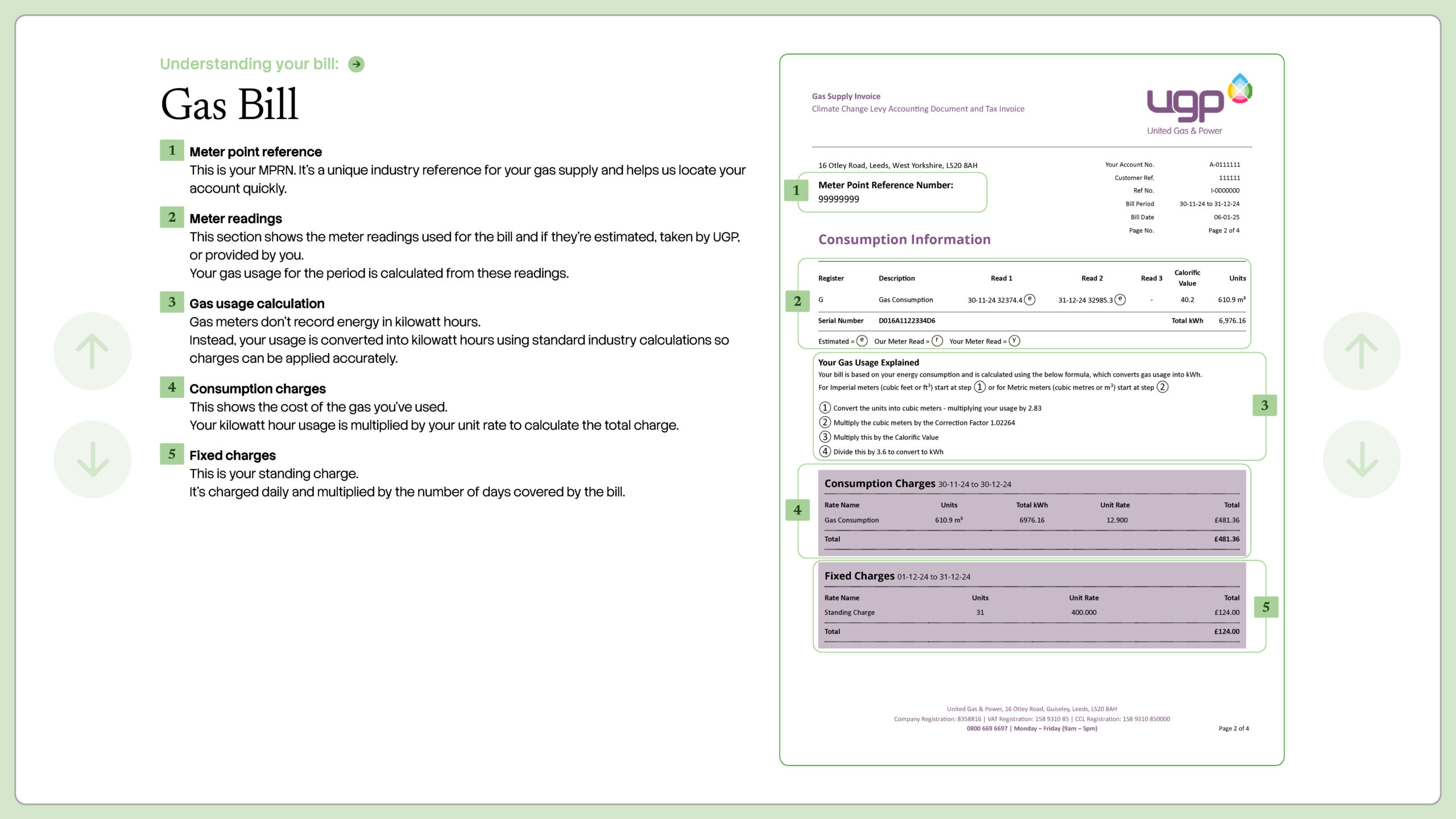
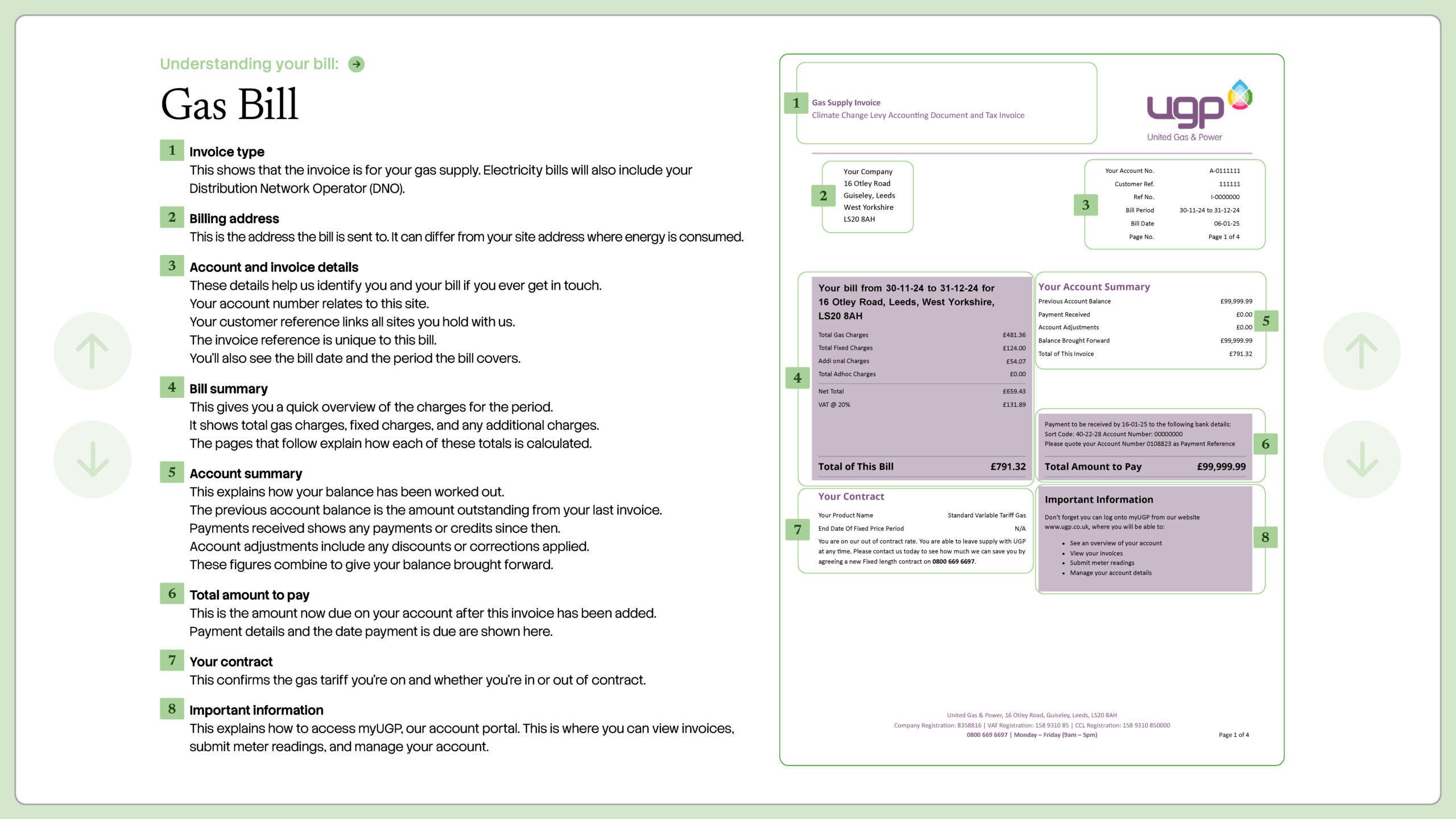
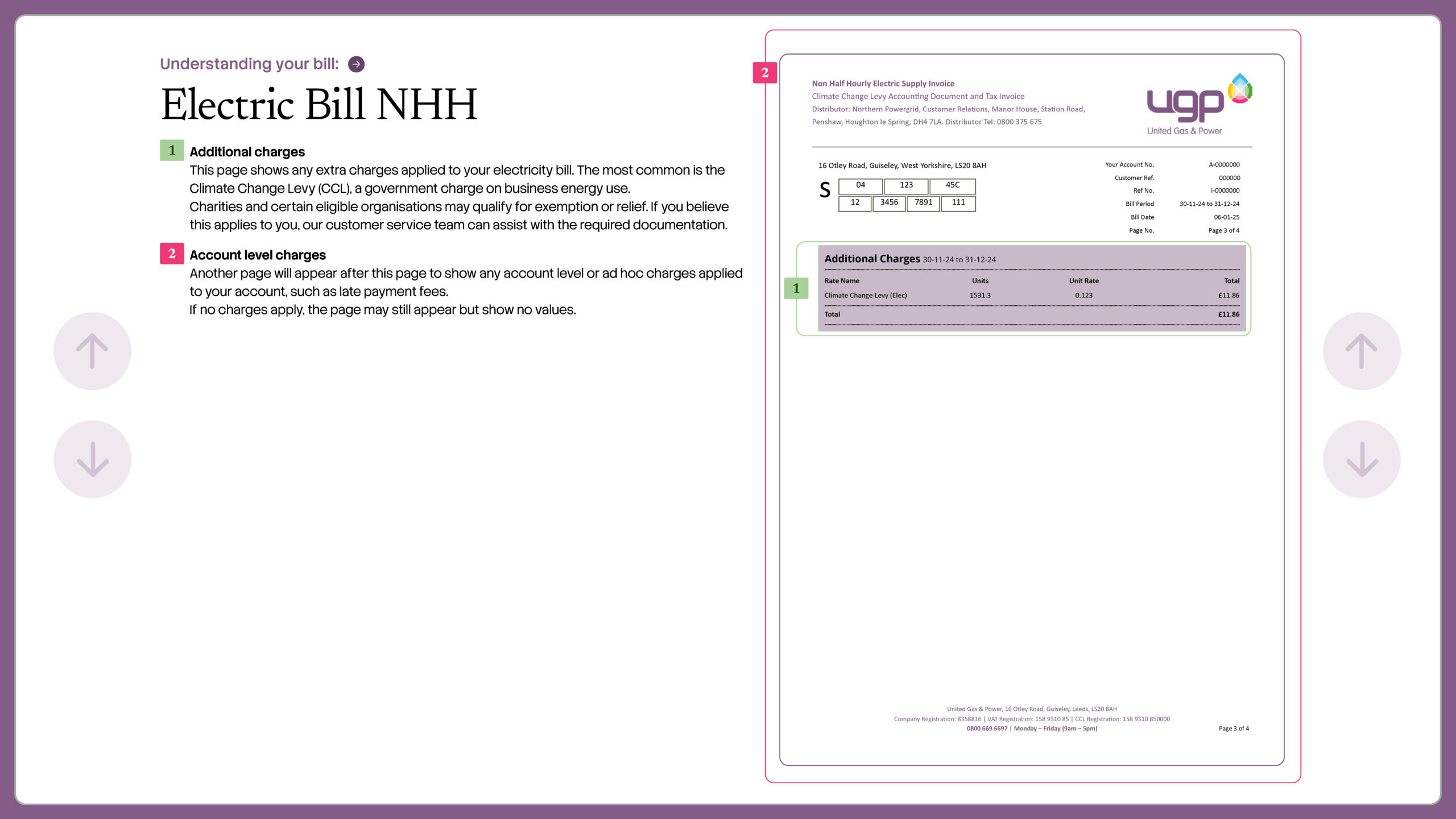
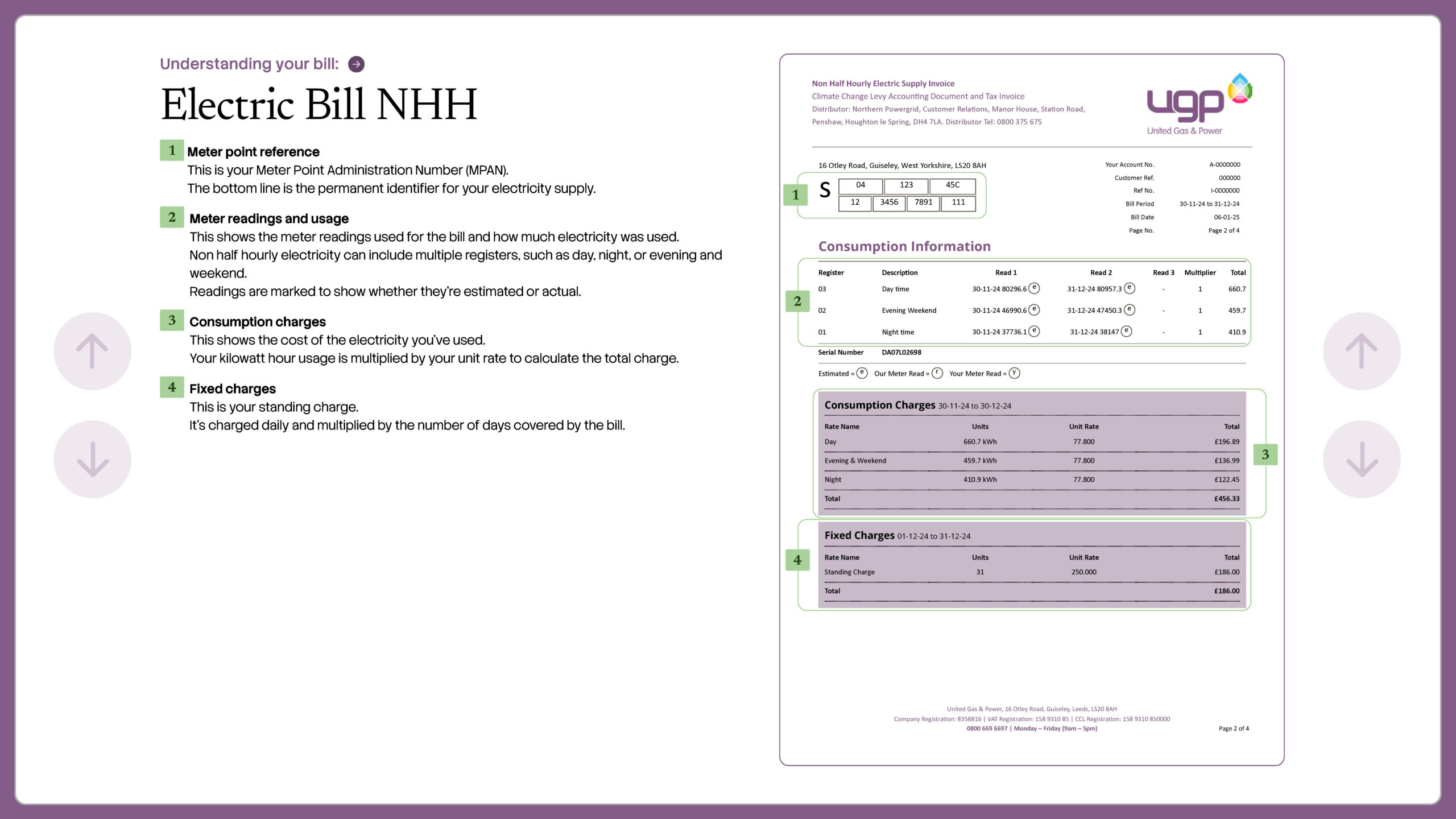
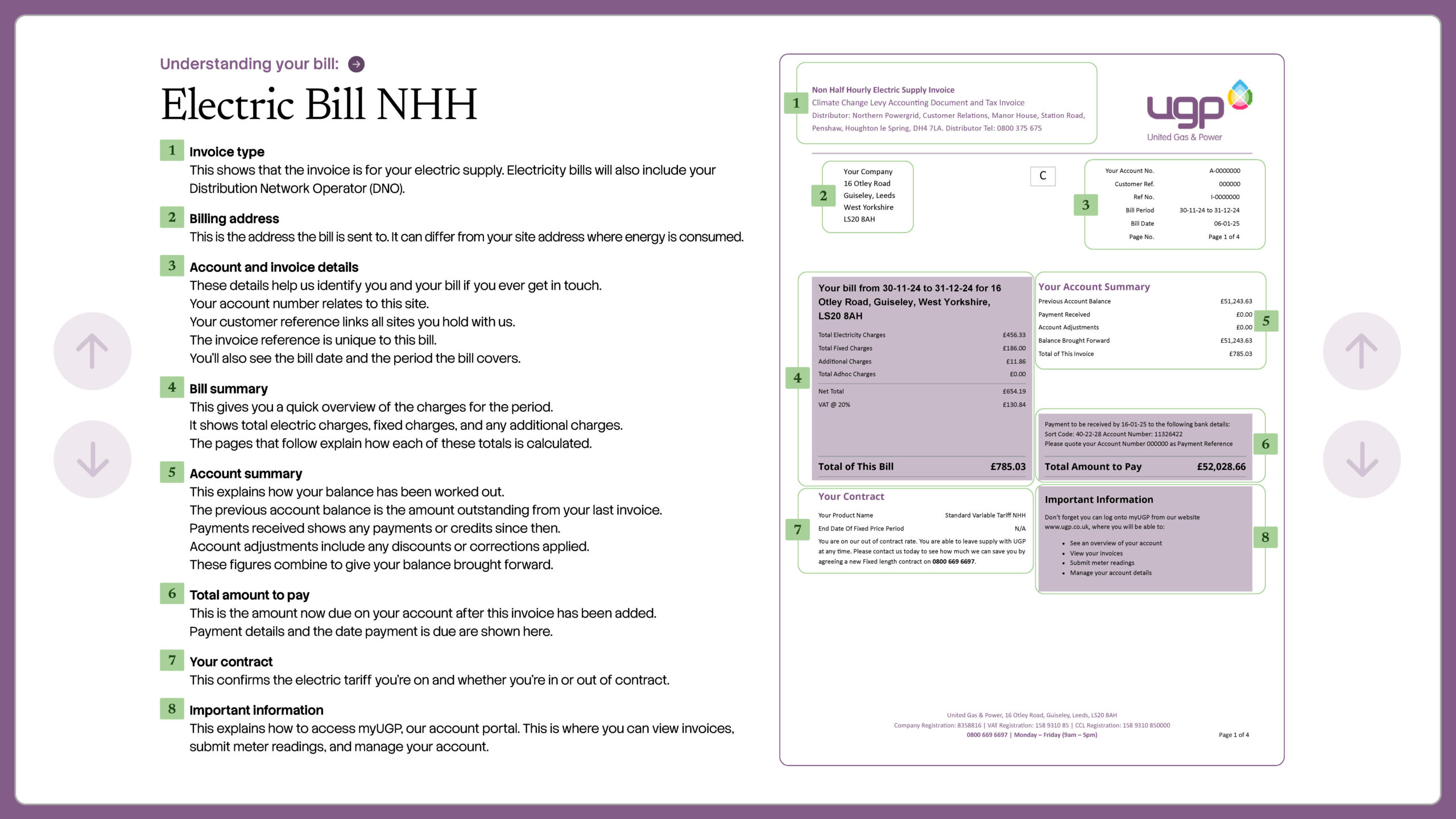
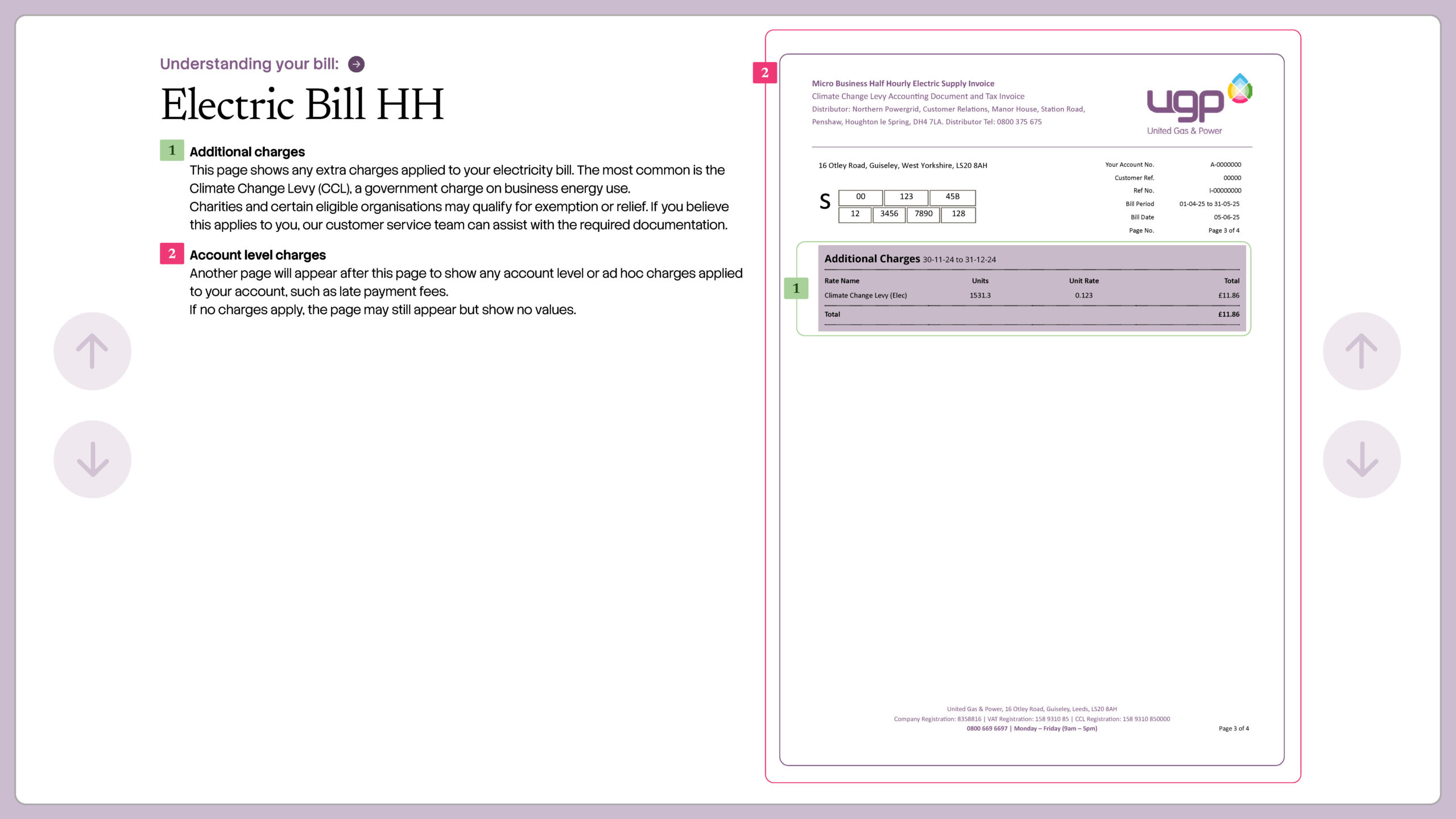
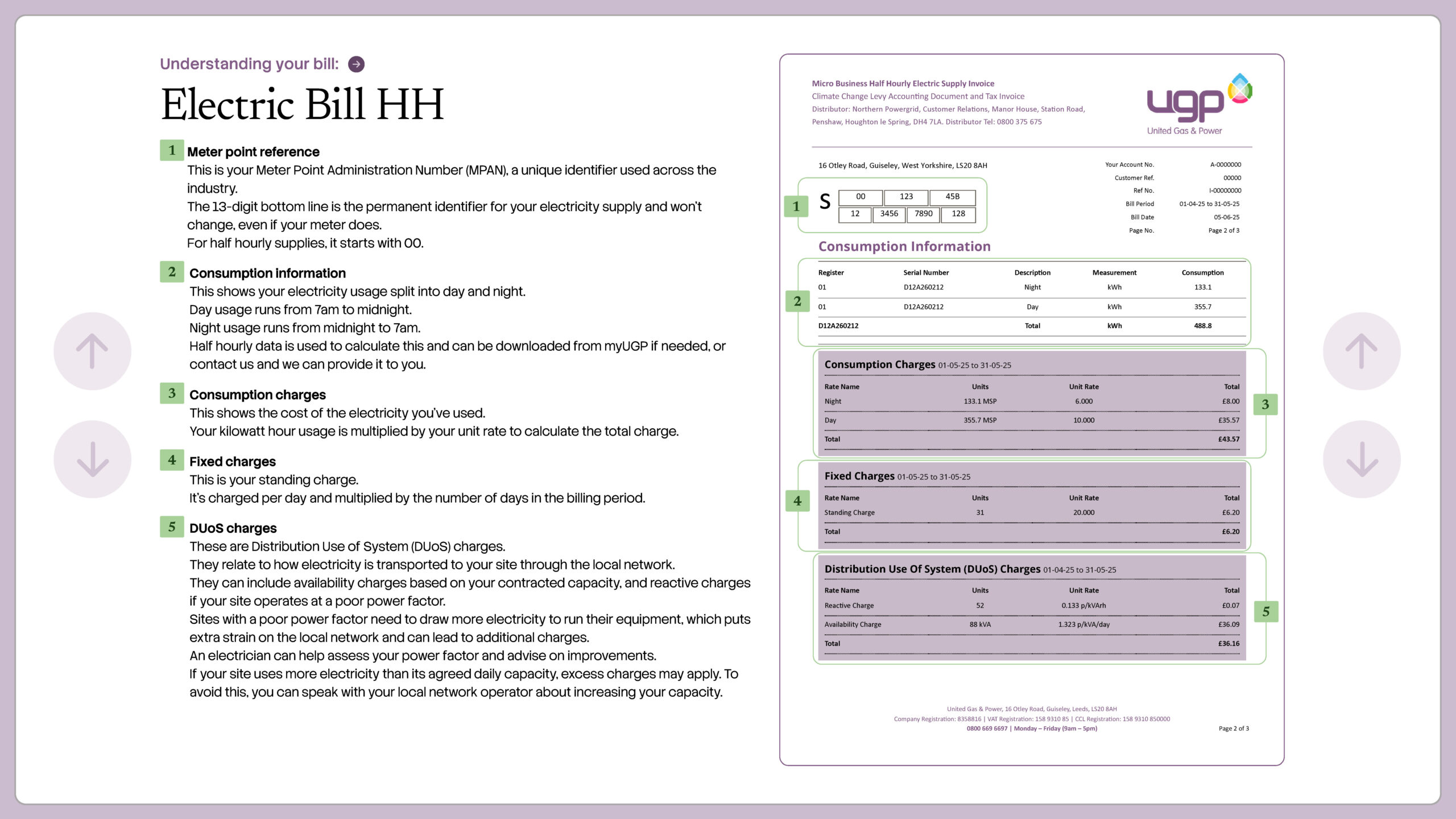
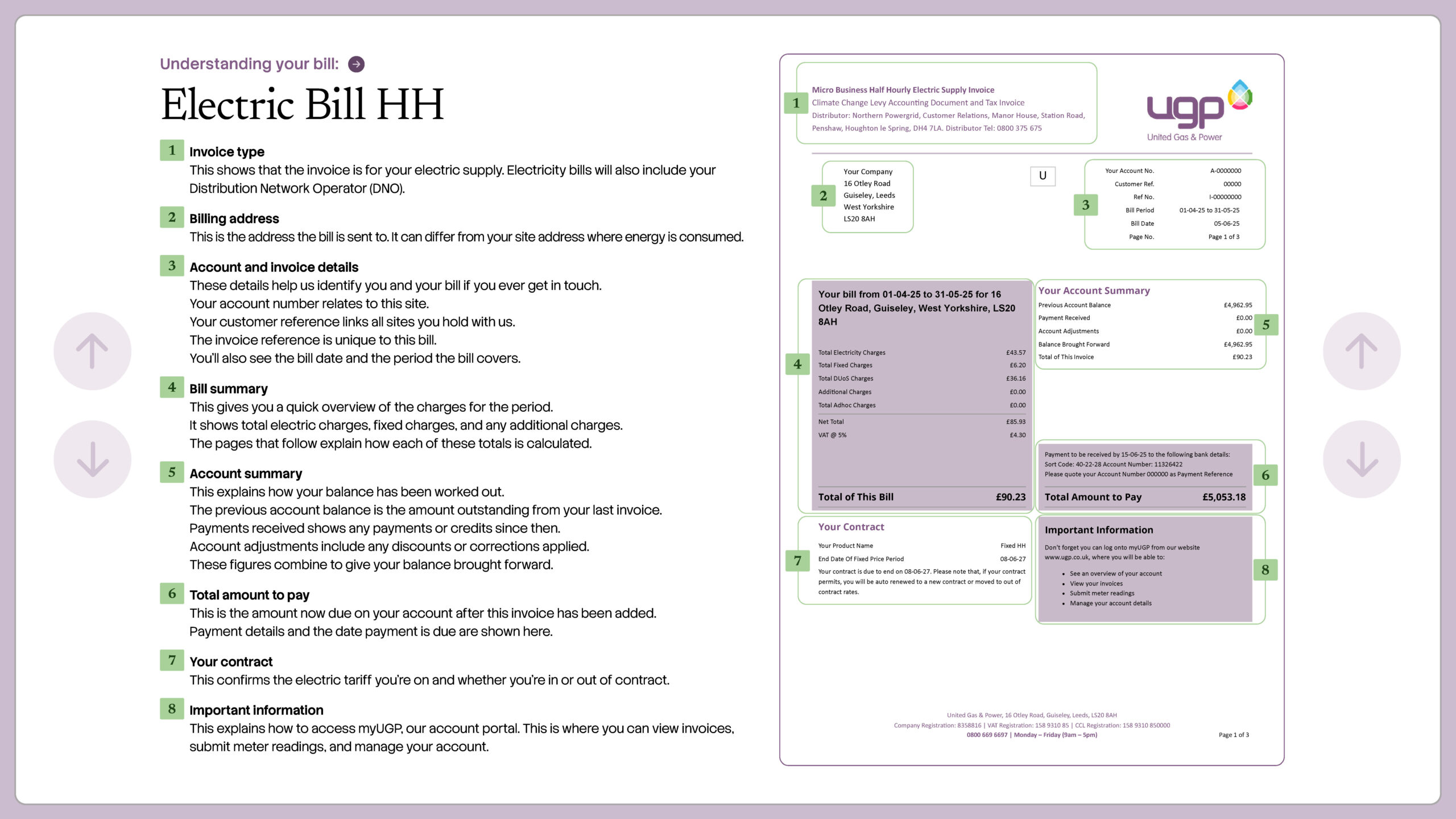
The examples cover:
- Half-hourly electricity bills, which may include detailed consumption information, Distribution Use of System charges, availability charges and reactive power charges.
- Non-half-hourly electricity bills, which show meter readings, electricity consumption charges, standing charges and any additional charges.
- Gas bills, which show the MPRN, meter readings, gas usage conversion into kWh, consumption charges and standing charges.
- Additional charges pages, which may show Climate Change Levy, account-level charges or ad hoc charges where they apply.
When reviewing your bill, start with the main summary page first. This gives you the account details, invoice period, bill summary, account balance, payment information and contract details. Then move to the usage pages, where you can check the meter readings, consumption, unit rate, standing charge and any additional charges.
How is a business energy bill calculated?
A business energy bill is usually calculated by combining usage charges, fixed daily charges, taxes, levies and any account adjustments.
In simple terms, the calculation often looks like this:
- Business energy bill = kWh used × unit rate + standing charges + taxes and levies + other charges or adjustments
The final amount can change for several reasons. Your usage may have increased, the bill may cover a longer period, your standing charge may have changed, an estimated read may have caught up, or a previous balance may have been added.
That is why it helps to look at the bill in parts rather than judging the total amount due on its own.
What makes up your business energy charges?
A business energy bill is not only the cost of the gas or electricity used. The final invoice can include several different charge types, depending on your contract, meter type and site.
| Charge type | What it usually means | Where to check it |
|---|---|---|
| Usage charge | The amount of energy used, measured in kWh, multiplied by the unit rate. | Meter readings, kWh used and charges section. |
| Unit rate | The price charged for each kWh of gas or electricity used. | Rates or detail of charges section. |
| Standing charge | A fixed daily charge linked to keeping the supply and account active. | Fixed charges or standing charge section. |
| Metering charges | Costs linked to metering, data collection or meter operation. | Detail of charges or contract terms. |
| Network charges | Costs linked to moving electricity or gas through the relevant networks. | Bill detail, contract terms or supplier explanation. |
| DUoS charges | Electricity distribution charges linked to moving power through the local network. | DUoS or Distribution Use of System charges section. |
| Availability or capacity charges | Charges linked to the agreed electricity capacity for a site, usually measured in kVA. | DUoS charges or capacity section on half-hourly bills. |
| Reactive power charges | Charges that may apply where a site places additional demand on the electricity network because of poor power factor. | DUoS charges or reactive charge section. |
| VAT | Tax applied to the supply. | VAT summary or invoice total section. |
| Climate Change Levy | Environmental tax applied to many business energy supplies. | CCL, additional charges or taxes and levies section. |
| Balance brought forward | A previous debit or credit carried into the current bill. | Account summary. |
| Adjustments | Corrections, credits, rebills or manual changes. | Adjustments, account-level charges or invoice summary section. |
Some of these charges may be bundled together, while others may be shown separately. If a line on the bill is not clear, ask your supplier to explain what the charge relates to and which period it covers.
Business energy bill explained: section by section
Most business energy invoices follow a similar logic, even when each supplier uses a different layout. The wording may change, but the core sections usually cover the same job.
If you’re concerned about your bill or believe a mistake has been made, check the main sections below before raising a query.
| Bill section | What it usually tells you | What to check |
| Account and invoice details | Customer number, invoice number, invoice date, payment due date and invoice period. | Check the bill covers the dates you expected and that the account is the right one. |
| Supply details | Site address, MPAN for electricity, MPRN for gas, meter serial number and sometimes distributor details. | Make sure the supply address and meter details match the site, unit or floor being billed. |
| Bill summary | A quick overview of the main charges for the billing period. | Review the total energy charges, fixed charges, additional charges, VAT and invoice total. |
| Account summary | Previous balance, payments received, adjustments and balance brought forward. | Check whether an older balance, payment issue or credit has affected the amount due. |
| Meter readings and usage | Opening read, closing read, read type, consumption and kWh used during the billing period. | Look for estimated readings, unusual jumps, gaps, overlaps or readings that don’t match your records. |
| Rates and charges | Unit rate, standing charge, calculated energy cost and any other billable items. | Compare the rate and standing charge with your contract, then review the total annual picture. |
| Taxes, levies and adjustments | VAT, Climate Change Levy, balance carried forward, payments received and credit or debit adjustments. | Check the tax treatment, account balance and any adjustment that changes the total due. |
| Contract and support information | Contract end date, tariff information, supplier contact details or payment routes, where shown. | Use this to plan renewals, queries or supplier reviews. |
How to read a business energy bill: step-by-step
Use this process whenever a new bill arrives, especially if your business has several sites, a recent meter change, a new contract or a billing query.
1. Start with the invoice period.
- Check the start and end dates so you know exactly what usage the bill covers.
2. Check the account and site address.
- This matters for multi-site businesses, shared buildings and businesses that have moved premises.
3. Find the supply number.
- Electricity bills use an MPAN. Gas bills use an MPRN. These details confirm the supply point being billed.
4. Match the meter serial number.
- This identifies the physical meter on site and helps catch mistakes after meter exchanges or change of tenancy events.
5. Review the meter readings.
- Check whether the bill is based on actual, customer, smart, advanced or estimated readings.
6. Check the kWh used.
- This is the usage figure that drives the main consumption cost on the bill.
7. Compare the unit rate and standing charge.
- A bill can look higher because usage has changed, rates have changed, fixed daily charges have changed, or a previous balance has been added.
8. Check VAT, CCL and adjustments.
- These can change the final invoice amount and may explain why the total differs from a simple usage calculation.
Keep a copy of the bill. It will help with future quotes, contract checks, bill queries and renewal planning.
Business energy bill explained by billing period and site
You can’t understand a business energy bill correctly without reference to the period it relates to.
This may sound obvious, but a bill covering five weeks will look different from a bill covering four. A catch-up bill after a long estimated period may look larger again.
The site address deserves the same attention.
A wrong unit number, old trading address or inherited site reference can lead to confusion, especially when a business manages more than one meter or several locations.
Find the supply details: MPAN, MPRN and meter serial number
A good bill should make supply details easy to refer to.
These references make sure the bill is tied to the correct supply, not just the correct company name.
- MPAN: the electricity supply number. UGP’s MPAN guide explains where to find it and why it matters for business electricity.
- MPRN: the gas supply number. UGP’s supply numbers FAQ explains how MPAN and MPRN details support account accuracy.
- Meter serial number: the number attached to the physical meter at the premises. It helps you check whether the bill is linked to the meter you can see on site.
The MPAN or MPRN identifies the supply point. The meter serial number identifies the meter fitted at the site. Keeping both in your records makes quotes, billing checks and tenancy changes much easier.
Understand energy bill unit rates and standing charges
The unit rate is the price charged for each kWh of gas or electricity used. The standing charge is a fixed daily cost linked to keeping the supply and account active.
Ofgem’s business energy guidance explains that business energy costs can include the unit rate, standing charge, taxes such as VAT and Climate Change Levy, network costs, metering and other charges. That is why the total bill can’t be judged from one line alone.
A lower unit rate may still create a higher total cost if the standing charge is higher, the usage assumption is wrong, or a balance has been carried forward. UGP’s business energy prices guide gives a wider breakdown of how commercial prices are built.
Don’t judge a business energy bill by the final total alone. Check the usage, the rate, the fixed daily charge and the balance position before you decide what has changed.
Check VAT, Climate Change Levy and tax treatment
Most commercial energy supplies are billed at the standard VAT rate, while some qualifying low-use, charitable, domestic-use or mixed-use supplies may be treated differently. HMRC’s VAT fuel and power notice explains the detailed rules.
Climate Change Levy, usually shortened to CCL, is an environmental tax applied to many business energy supplies. HMRC publishes the current CCL rates, and GOV.UK notes that CCL main rates are listed on a business energy bill.
If the VAT or CCL line looks unusual, check it before the bill is filed away.
UGP’s regulations FAQ also summarises low-use thresholds and VAT treatment for businesses that may qualify for reduced rates.
How to read a business electricity bill vs business gas bill
Electricity and gas bills share the same basic structure, but a few details are fuel specific. Use the table below when you are comparing both fuels at the same time.
| Detail to check | Business electricity bill | Business gas bill |
| Supply number | MPAN, sometimes shown as the supply number or S-number. | MPRN, the gas supply point reference. |
| Meter detail | Meter serial number, meter type and sometimes half-hourly or non-half-hourly references. | Meter serial number and gas meter details. |
| Usage | Usually shown directly in kWh. | Meter units may be converted into kWh using gas conversion details. |
| Technical data | May include profile class, Line Loss Factor Class, distributor or half-hourly data references. | May include meter units, correction factor, calorific value and conversion information. |
| Costs to compare | Unit rate, standing charge, VAT, CCL, network and metering cost treatment. | Unit rate, standing charge, VAT, CCL and gas transportation cost treatment. |
Why network and non-commodity costs appear on business energy bills
A business energy bill explained properly for UK companies also needs to cover the costs that sit behind supply. The energy itself is only one part of the commercial picture.
Ofgem’s non-domestic billing transparency guide encourages clearer information about commodity and non-commodity costs, including network charges and other costs.
In practice, this means a bill or quote may include costs linked to transmission, distribution, balancing, metering, policy schemes and supplier service.
For electricity, you may hear terms such as DUoS, TNUoS, BSUoS, Line Loss Factor or MHHS. UGP’s NESO and network costs guidance, line loss factor guide and MHHS page are useful next reads if those terms appear in a quote, invoice or support conversation.
Common business energy bill problems to watch for
Most billing issues are easier to sort when the detail is checked early. These are the problems that tend to create avoidable admin.
| Possible issue | What it may mean | Best first check |
| Estimated readings | The supplier has calculated usage without a confirmed opening or closing read. | Take a fresh meter reading and submit it through the correct route. |
| Wrong supply details | The bill may be tied to the wrong MPAN, MPRN, meter serial number or site record. | Compare the bill with the physical meter and your site records. |
| Unexpected usage jump | Operations may have changed, a read may have caught up, or a previous estimate may have been too low. | Compare the period with previous bills and note any operational changes. |
| Higher standing charge | Fixed daily charges, network cost treatment or contract terms may have changed. | Check the contract and ask the supplier to explain the charging basis. |
| Balance carried forward | Older charges, payments, credits or adjustments may have been rolled into the current bill. | Reconcile recent bills and payments before querying the total. |
| Contract date confusion | A renewal, termination window or new contract start date may be approaching. | Find the end date and notice position, then plan the next review. |
What to do if your business energy bill looks wrong
If something looks wrong, gather the evidence before raising the query. This will give your supplier enough detail to investigate.
- Take a clear photo of the meter reading and meter serial number.
- Keep the invoice number, account number and supply address to hand.
- Check the MPAN or MPRN against your records.
- Compare the usage with previous bills for the same site.
- Check whether the opening or closing read is estimated.
- Ask the supplier to explain the charge, adjustment or tax treatment in writing.
- Keep a record of calls, emails, meter photos and updated invoices.
If the issue becomes a complaint, start with your supplier’s complaints process. Eligible small businesses may be able to use the Energy Ombudsman after the supplier has issued a deadlock letter or the matter has been unresolved for eight weeks.
Using your bill to compare a new business energy quote
A recent bill is one of the most useful documents you can provide when requesting a business energy quote. It gives the supplier the supply number, meter details, consumption history and current charging information.
If you’re planning to switch supplier, UGP’s change energy supplier guide explains the practical steps, including checking contract dates, gathering MPAN or MPRN details and comparing terms before agreeing a new contract.
Energy bill tracking for multi-site businesses
For businesses with several sites, one tidy tracker can prevent a lot of billing confusion. It gives finance, operations and procurement teams the same view of every supply.
| Tracker field | Why it helps |
| Site name and full address | Prevents confusion between units, floors, meters or trading names. |
| Fuel type | Separates electricity, gas and any other supply arrangements. |
| MPAN or MPRN | Confirms the supply point being billed or quoted. |
| Meter serial number | Lets the site team match the bill to the physical meter. |
| Latest read and read date | Keeps usage checks current and reduces reliance on estimates. |
| Contract end date and notice date | Helps avoid rushed renewals or unwanted out-of-contract periods. |
| Named contact or support route | Makes it easier to resolve queries quickly. |
Business energy bill checklist
Use this quick checklist whenever an energy invoice lands. It works as a monthly bill check and as a pre-quote review before you compare suppliers.
- Is the account number right?
- Does the invoice period match the expected billing cycle?
- Is the site address correct?
- Does the MPAN or MPRN match your records?
- Does the meter serial number match the meter on site?
- Are the reads actual, smart, customer or estimated?
- Does the kWh usage look reasonable for the period?
- Do the unit rate and standing charge match the contract?
- Are VAT, CCL and adjustments clearly shown?
- Is there a balance carried forward that needs reconciling?
- Is the payment due date clear?
- Is the contract end date or notice position approaching?
UGP helps make business energy bills easier to understand
Reading a business energy bill gets much easier once you know what each section is trying to show. The key is to work from the supply details through to the usage, rates, fixed charges, taxes and account balance.
If your bill feels unclear, don’t wait until renewal pressure builds.
FAQs about business energy bills
What does business energy bill explained mean?
It means breaking down a commercial energy invoice into plain English, including the account details, supply number, meter readings, usage, unit rate, standing charge, VAT, CCL, adjustments and final amount due.
What is the most important part of a business energy bill?
The most important details are the site address, supply number, meter readings, kWh used, unit rate, standing charge and total due. For contract reviews, the contract end date and notice position are also important.
How is a business energy bill calculated?
A business energy bill is usually calculated by multiplying the kWh used by the unit rate, then adding standing charges, taxes, levies, other charges and any account balances or adjustments.
Where is the MPAN on a business electricity bill?
The MPAN is usually shown in the supply number section of an electricity bill. It may be called the supply number, S-number or Meter Point Administration Number.
Where is the MPRN on a business gas bill?
The MPRN is usually shown in the supply details section of a gas bill. It identifies the gas supply point for the premises.
What is the difference between a meter serial number and a supply number?
The meter serial number identifies the physical meter. The MPAN or MPRN identifies the electricity or gas supply point. Both details help confirm that the bill is tied to the correct site.
What does estimated mean on a business energy bill?
An estimated reading means the supplier has calculated usage without a confirmed meter read for that point. If the estimate looks wrong, submit an up-to-date reading and ask for the bill to be reviewed.
Why has my business energy bill gone up?
A bill can increase because usage has risen, the invoice period is longer, rates have changed, standing charges have changed, a balance has been carried forward, or a previous estimated period has caught up.
What is a standing charge on a business energy bill?
A standing charge is a fixed daily cost connected to keeping the supply and account active. It applies even when little or no energy is used during the period.
What is a unit rate on a business energy bill?
The unit rate is the price charged for each kWh of gas or electricity used. It is one of the main cost lines on the bill, but it should be reviewed alongside the standing charge and total annual cost.
What is CCL on a business energy bill?
CCL stands for Climate Change Levy. It is an environmental tax applied to many commercial energy supplies, with rates set by HMRC.
Is VAT charged on business energy bills?
Yes, most commercial energy supplies include VAT. Some qualifying low-use, charitable, domestic-use or mixed-use supplies may qualify for different treatment, so check HMRC guidance or ask your supplier if the VAT line looks wrong.
Can a smart meter stop estimated business energy bills?
Smart meters can reduce reliance on estimated readings because they send usage data automatically. It is still worth checking the first bills after a new contract, meter change or communication issue.
What is a half-hourly business electricity bill?
A half-hourly business electricity bill uses consumption data recorded in half-hour periods. It is more common for larger or higher-usage electricity supplies and may include extra details such as capacity, metering and network-related charges.
What is a capacity charge on a business electricity bill?
A capacity charge is linked to the agreed electricity supply capacity for a site, usually measured in kVA. It is more common for larger or half-hourly electricity supplies.
What is a reactive power charge?
A reactive power charge can apply where a site uses electricity inefficiently and places additional demand on the network. It is more common for sites with larger motors, machinery, refrigeration, pumps or similar electrical equipment.